Adapting the ALV Object Model Output
Output Options
There are three output options for the ALV object model. Full screen ALV is the standard output. To display the ALV as a classic list, assign the value X to the list_display parameter when you call the FACTORY method. If the parameter has space as its value, the ALV is displayed in full screen mode.
Content and Structure Changes
The contents of the internal table which contains the data for the ALV may be changed in various ways in the program. The way these changes impact the display at the frontend in the ALV output depends on the type of change made.
The possibilities are :
- Change the content or sequence of individual data records and then refresh the ALV output.
- Replace the entire data table.
Refreshing the ALV Output
You do not need to refresh the ALV output for the following changes:
- Changes to the display of columns
- Changes to the sequence of columns in ALV display
- Changes to the ABAP Dictionary reference for columns
There are two options when refreshing ALV display, as follows:
- All settings for filters and sorting are retained. This setting can result in newly inserted data records not being displayed because these data records are hidden by the filter setting.
- All settings for filter and sorting are deleted.
The method REFRESH of CL_SALV_TABLE is used to refresh the display.
|
Function |
Class |
Method |
|
Refresh ALV output without deleting filter and sorting settings |
CL_SALV_TABLE |
REFRESH (REFRESH_MODE parameter - SOFT ) |
|
Refresh ALV output by deleting filter and sorting settings |
CL_SALV_TABLE |
REFRESH (REFRESH_MODE parameter - FULL) |
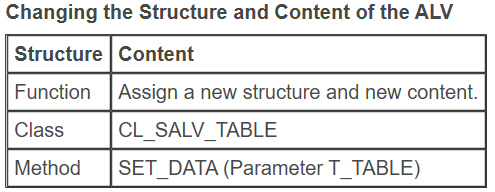
New Structure and New Contents
You can assign a new structure and new content to the ALV with the SET_DATA method of the class CL_SALV_TABLE (pass a new internal table using the t_table parameter). If you assign a new structure with SET_DATA, all objects, such as sorting objects that are related to the previous structure, are deleted.