ABAP Database Connectivity(ADBC)
Logical sequence for reading Data with ADBC
- Choose database connection (only when accessing secondary DB): Call method get_connection() of class CL_SQL_CONNECTION.
- Create a statement object: Instantiation of class CL_SQL_STATEMENT
- Fill string variable with SQL syntax: Use either CONCATENATE or string templates/string expressions
- Issue native SQL call: Call method execute_query() of class CL_SQL_STATEMENT
- Assign target variables for result set: Call method set_param() or set_param_table() of class CL_SQL_RESULT_SET
- Retrieve result set: Call method next_package() of class CL_SQL_RESULT_SET
- Close result and release resources: Method close() of class CL_SQL_RESULT_SET
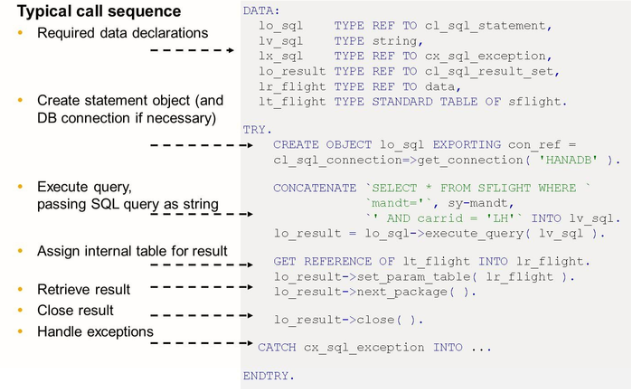
When using native SQL, you should be aware of several pitfalls, such as the following:
- The syntax of a native SQL is not checked by the ABAP compiler. Handle exception CL_SQL_EXCEPTION to be able to analyze messages returned by the database if the native SQL string contains an error.
- Native SQL calls bypass the ABAP database interface which results in bypassing the ABAP table buffer and in where condition the CLIENT field is mandatory.