Implementing New BADI Menu Exits
Principle and Architecture of BADI Menu Exits
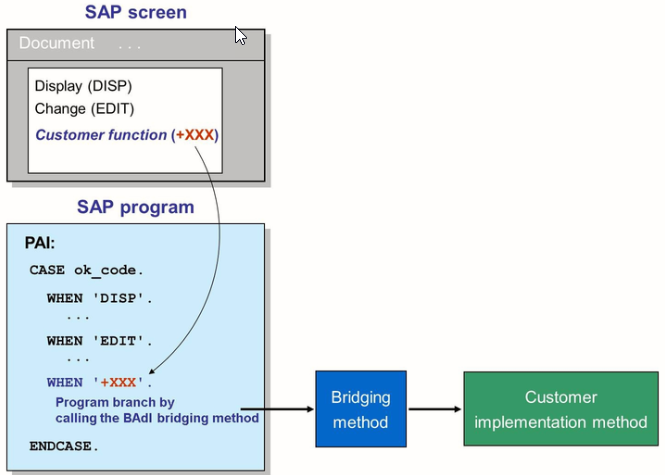
Exits of Menu type can have only one active implementation. Menu exits provide customers with the option to implement additional menu entries, which trigger custom code on SAP screens.
Architecture and details of BADI menu exits
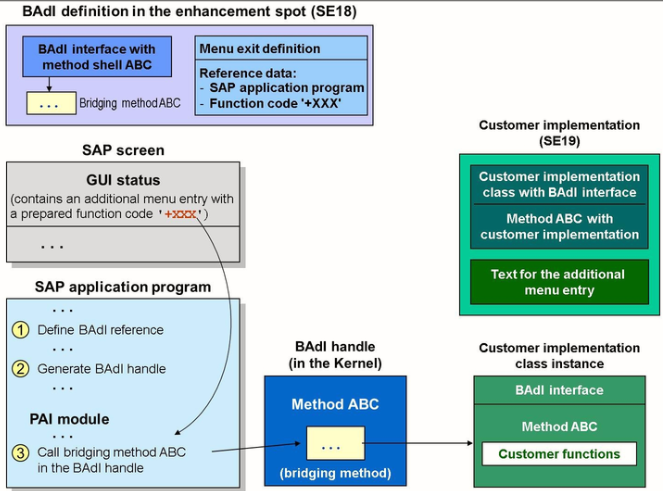
In this figure, for the corresponding GUI status the developer of the SAP screen prepares a menu option, which is not yet visible, with a specified function code. You will also find a BADI program exit related to this function code in the Process After Input (PAI) flow logic of the screen in question, the program exit can be used to implement function.
When a customer implements a BADI of this type, they do not just specify the text for the additional menu option. They must also implement the BADI program exit with the coding that will be executed when the user chooses the menu entry. When the BADI menu exit is implemented, the entry in the SAP screen menu is activated and will be visible. If the user chooses the menu entry, the custom logic is processed.
Syntax of BADI Menu Exit
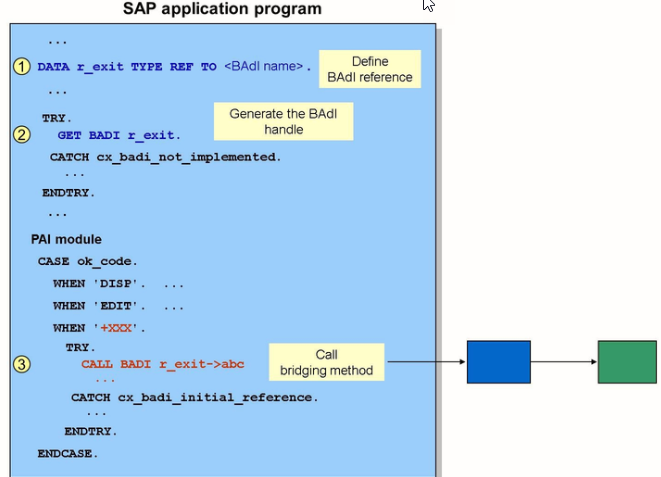
BADI Menu Exits - Implementation

Steps to implement BADI menu exit:
- In the GUI status of the screen, search for the function code that begins with a +
- In the PAI modules of the screen, search for a reference to the corresponding function code
- For the CALL BADI command that relates to the function code, double click the reference variable used in the call to navigate to its definition
- To navigate to the display of the corresponding enhancement spot to which the BADI belongs, double click the BADI used for the type assignment
- Read the BADI documentation and, if necessary, create an implementation for the spot and then an implementation for the BADI itself
- Implement the program exit available in the BADI
- Double click the menu exit available in the BADI to implement it.
- Specify the text for the additional menu entry
- Activate all objects