Implementing New BADI Program Exits
The architecture of New BADI program Exit
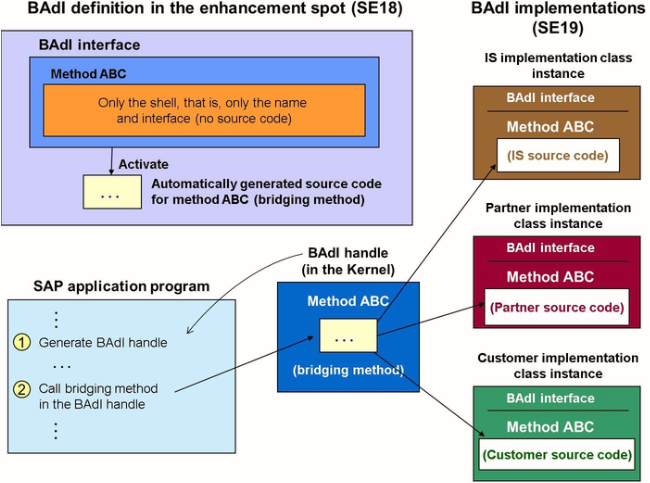
The new BADI technology works similarly to classic BADI. BADI adapter classes are no longer created, which means the SAP application program does not need to instantiate them. Instead, at runtime of the application program, the system generates a BADI handle in the kernel, which performs the same function as the adapter class and calls the available implementation methods more efficiently.
New BADI Program Exit syntax
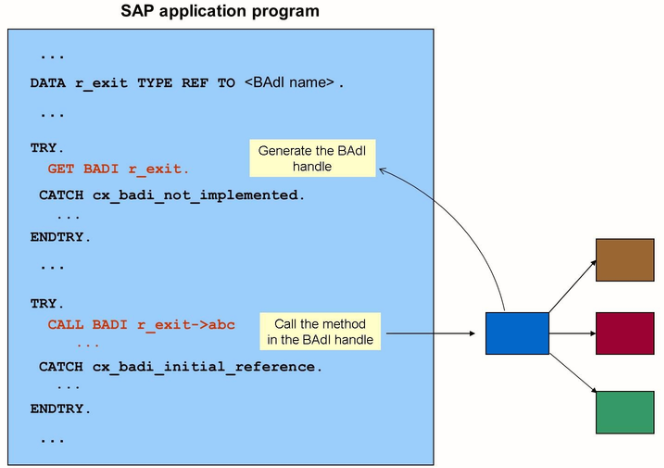
The figure shows the syntax in an SAP program that is calling a new BADI.
In contrast to the classic BADI technology, the reference variable is typed directly to the BADI, rather than the BADI interface.
The SAP program generates the BADI handle using the GET BADI statement that specifies the reference variable. If no active implementation of the BADI is found, the CX_BADI_NOT_IMPLEMENTED exception is triggered.
The SAP program branches to the relevant implementation when the bridging method in the BADI handle is called (Call BADI). If an initial handle reference is used for the CALL BADI statement, exception cx_badi_initial_reference is triggered.
Steps to search for New BADI Program Exits
- Perform a global search in the program for GET BADI
- Double click the reference variable used in the GET BADI statement to navigate to the variable definition
- Double click the BADI name to navigate to the display for the corresponding enhancement spot
Alternatively, you can set a breakpoint for method GET BADI and get the BADI name
Steps to implement New BADI program Exit
- Display the corresponding enhancement spot
- Choose implement enhancement spot and create the enhancement implementation
- Specify a name for the enhancement implementation
- Specify a name for the BADI implementation (s)
- Maintain attributes for the BADI implementation (s)
- In the navigation area for the required BADI, choose implementing class.
- Specify the name of the implementing class, which may be inherited from the sample class. Alternatively, you can copy it. Choose the change pushbutton.
- Double click the method to implement or adjust them
- Activate the method and all corresponding data, including the enhancement implementation.
Implementing of NEW BADI program exits
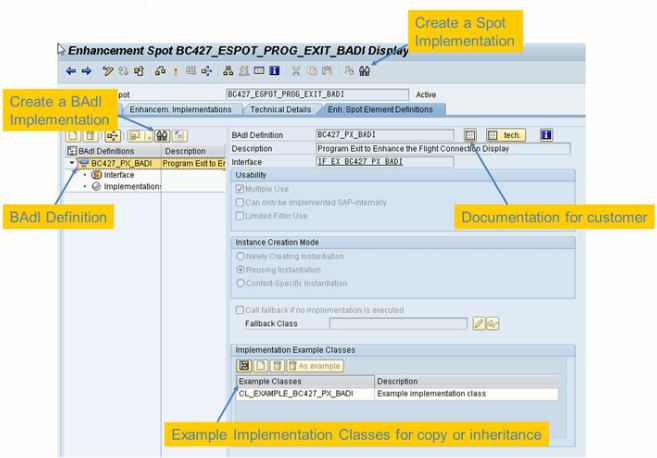
To use a BADI, you must create an enhancement implementation that is an implementation of higher-level enhancement spot. You must create a BADI implementation for each badi you want to use in the enhancement spot.

The figure shows you an enhancement spot implementation with a new BADI implementation.
Filter-Dependent BADIs
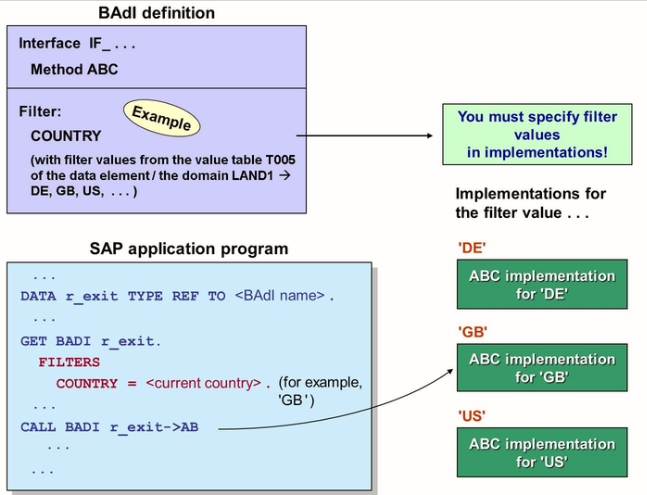
Filter-dependent BADI now allow the following:
- Numeric filters
- Implementation with not only single filter values, but also filter condition using the operator <>, >, <, <=, >=, CP and NP
- Multiple filters for one BADI implementation