OData Queries
OData Query Language
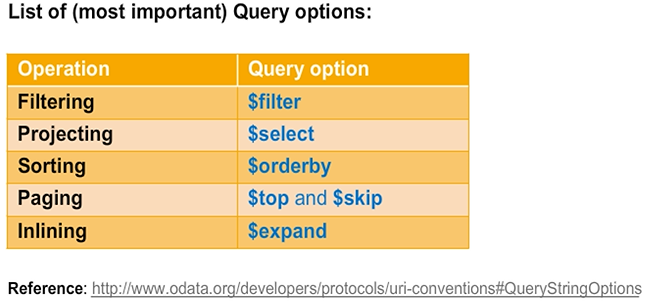
OData specifies a simple, yet powerful query language that allows a client to request arbitrary filtering, sorting, and paging. A client is able to express, via query string parameters, the amount and order of the data that an OData service returns for the resource identified by the URI. The names of all query string parameters defined by OData are prefixed with a “$” character.
The next section explains how to reduce the data volume transferred from the server to the client by filtering data sets and by selecting the relevant data properties only. Paging is another way to reduce data traffic, and sorting guarantees the right sequence of the entities within a requested entity set.
A client can also instruct the server to include associated data entries in the response. This technique avoids subsequent read operations.
Patterns for UI-Centric Applications
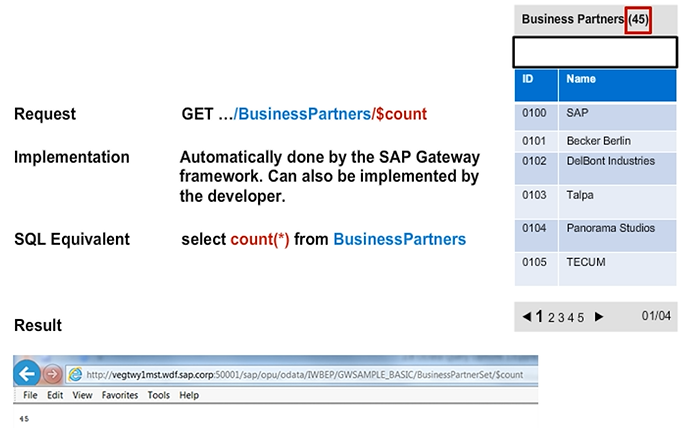
All of these query options can be used in patterns we frequently find in lightweight UIs. Let’s focus on the query option $count. The use case is to retrieve the number of entries of a collection. This way the client developer can show the user how many objects were found.
Though the framework supports $count out of the box, by default it performs a full table scan. It can, however, be made significantly faster by the developer.
OData Query Options — $select
$select is used to limit the result set for a consumer application by limiting the number of columns that are retrieved by the consumer. Here we only want to retrieve the business partner ID and the name of a business partner.
The query option $select is supported by the framework. The developer can, however, use this information to also limit the amount of data that is retrieved from the SAP Business Suite System if the interface being called also supports the use of select options.

OData Query Options — $filter
$filter is used to limit the result set for a consumer application by limiting the number of rows and columns that are retrieved. The following requests could be made by using $filter:
- Get all business partners whose company name starts with the letter ‘S’.
- Get all sales orders with a total sum larger than €10,000.
- Only retrieve the business partner ID and the name of a business partner.
With a $filter, you can apply several options to filter a result set. A filter can be applied to all properties of an entity set. These should be marked as sap: filterable.
For the business partner, you could, for example, filter the name or the BusinessPartner ID. You could also perform a wild card search. The SAP Gateway framework will (if possible) convert the filter string passed with $filter into a select option table or oSQL statement, which can be used in the service implementation by the ABAP developer.

OData Query Options — $top
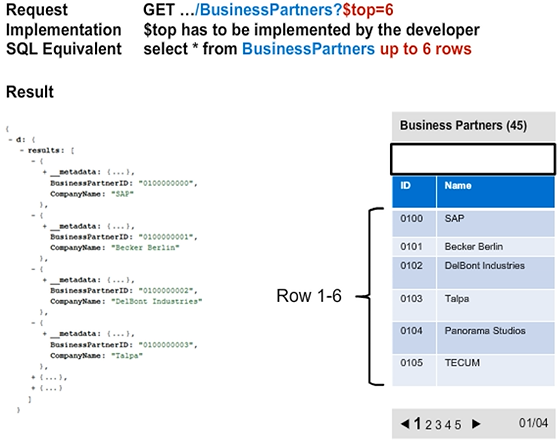
The query options $top and $skip can be used for client-side paging.
When solely using the query option $top, the service will only return the first <n> results specified by the number passed via $top, so that it fits on the first screen of the client application.
OData Query Options — $skip
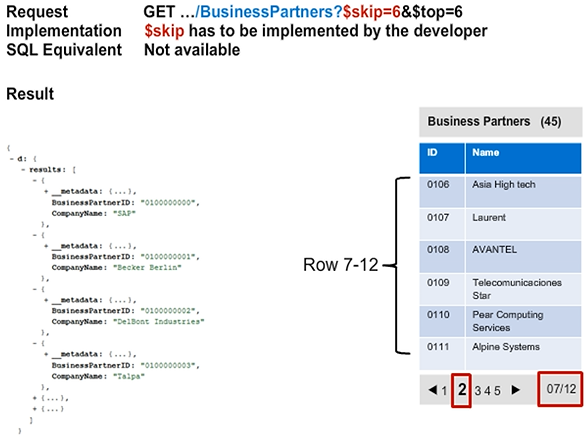
When navigating to the second page you have to use the $skip parameter.
The client retrieves only six items ($top) but skips the first 6 and therefore starts with Business Partner No 0106.
Note: The first business partner in the example has the number 0000.
OData Query Options — $inlinecount
We saw how to limit the result set to only the first 6 entries in OData by using the statement $top=x.