Processing and Monitoring IDocs with AIF
That means again you have to create entries for WE57, WE42 and WE20 as described for Scenario2 above.
But the next step is different. You have to create an action as well, but this time you can program the action however you want to.
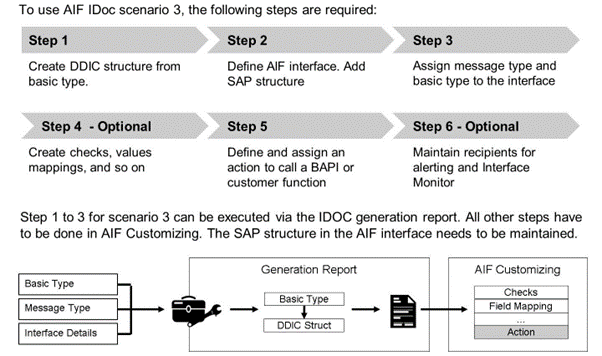
For a scenario 3 IDoc interface, you have to specify the interface engines as follows:
- Application Engine: IDoc
- Persistence Engine: IDoc
- Selection Engine: AIF Index Tables
- Logging Engine: AIF Application Log
If the generation report is used to create the interface, the engines are already set accordingly for the interface.
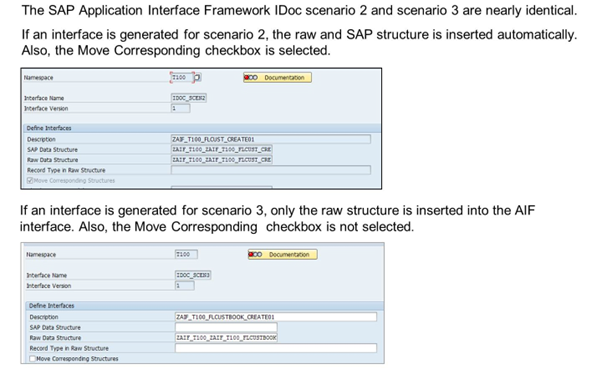
If scenario 3 is used, you need to maintain the SAP data structure. The structure of the SAP data structure depends on the function modules called in the action. The SAP data structure has to be created manually. Since the SAP and raw data structure differ, a structure mapping is required. This scenario is usually applicable if you have your own custom-specific basic type and want to call, for example, a BAPI.
Scenario 4: IDoc Monitoring with Additional Enabler Call
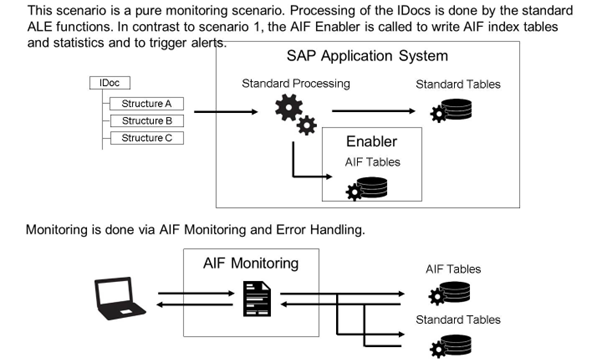
Scenario 4 is, like scenario 1, a pure monitoring scenario. In comparison to IDoc scenario 1, you can use some advanced features of AIF. You can use alerting, interface-specific index tables, and interface-specific selection screens. If a recipient was specified, the IDocs can also be displayed in the Interface Monitor.
The AIF enabler for IDocs is called every time an IDoc status is updated. The IDoc enabler determines the interface based on the settings in interface determination. If a corresponding AIF interface is found, index table entries can be written and alerts are created. If a corresponding AIF interface is not found, the ALE processing continues as usual. The processing of IDocs that do not have an AIF interface assigned is not interrupted.
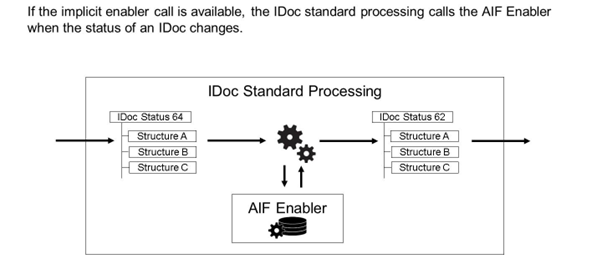
The AIF Enabler writes the status changes of the IDoc into the Standard Single Index table or your Single Index Table or Multi Index Tables. This enables you to use all Index Table relevant features like recipient assignment.
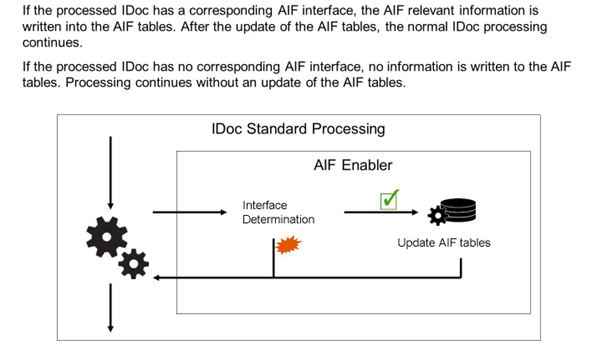
The figure illustrates the steps, when the AIF Enabler is installed and working.
An AIF Interface with the generated AIF IDoc Structure as RAW and SAP Structure is a prerequisite.
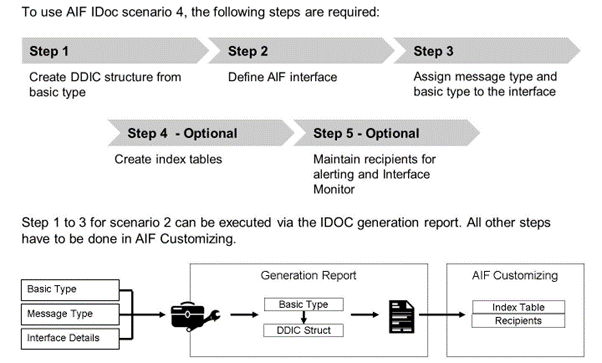
For a scenario 4 IDoc interface, you have to specify the interface engines as follows:
- Application Engine: IDoc
- Persistence Engine: IDoc
- Selection Engine: AIF Index Tables
- Logging Engine: IDoc Status Records (it is also possible to select the AIF Application Log Engine)
If the generation report is used to create the interface, the engines are already set accordingly for the interface.
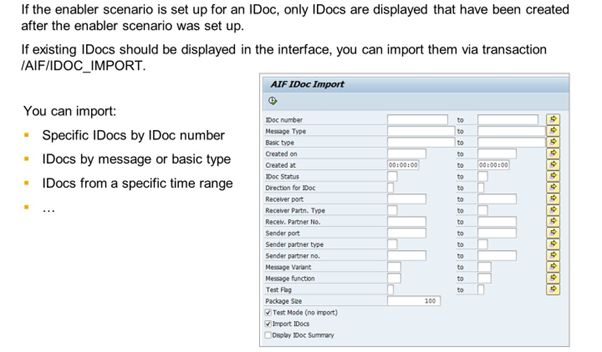
Importing IDocs into the system and processing them to the Index tables help you find IDocs that posted with an error for different recipients. This makes monitoring easier than in the IDoc Transactions.