Enabling Input Fields and Value Help
Field ( mandatory : create )
- Dynamic field attribute.
- Defines a field as mandatory during create operations. This means that an external consumer must set the fields in question only during create.
In an OData scenario, the fields are marked as mandatory on the user interface.
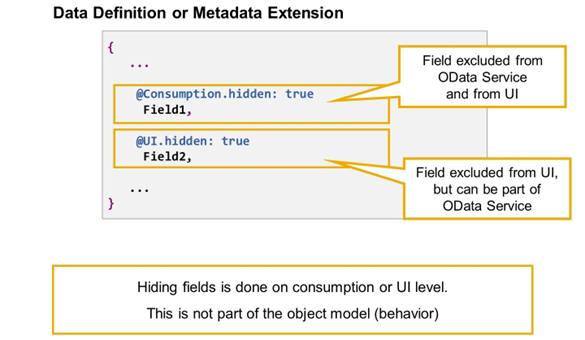
Hidden Fields
Hiding fields is a question of consumption and the user interface (UI). It is not part of the object model, therefore, it is not possible to hide fields by editing the CDS behavior definition.
Fields can be hidden by one of the following annotations:
@Consumption.hidden: true
The field is not exposed for any consumption. This means that it is part of the OData Service and, therefore, not available on the UI.
@UI.hidden: true
The field is not available on the UI. This means that it is not displayed and the user cannot make it visible using personalization. If, however, there is no additional annotation @Consumption.hidden: true, the field can still be part of the OData Service.
Value Help for Input Fields
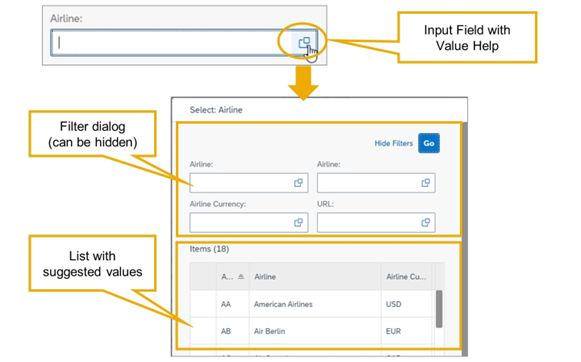
Value-Help in SAP Fiori App
The implementation of a value help in CDS enables the end user to choose values from a predefined list for input fields on a user interface.
In SAP Fiori elements apps, value helps are invoked by choosing the value help button next to the input field or by pressing F4.
By default, the value help dialog consists of a filter dialog, which the user can hide and unhide, and a list with suggested values.
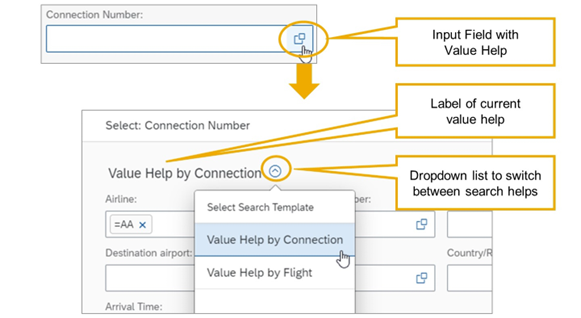
Multiple Value Helps on One Input Field
It is possible to provide more than one value help on one input field. The end user can select which value help to use from a dropdown list.
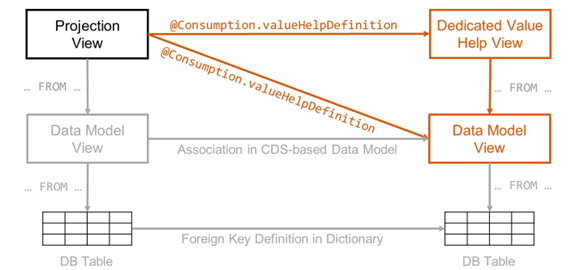
Providing Value Help in CDS-based OData Service
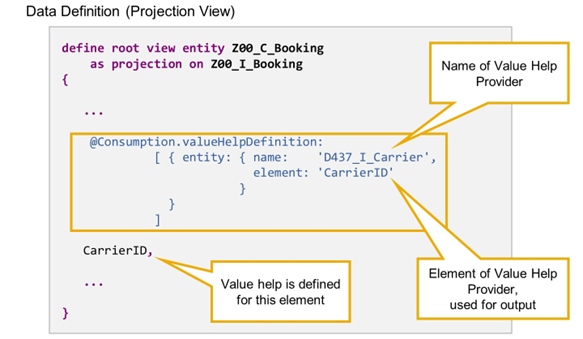
To provide a value help for a given field, you first need a CDS view that contains the values for the value help. This view is referred to as the value help provider. Then, you annotate your field with @Consumption.valueHelpDefinition and provide the name of the value help provider and an element for the mapping in the annotation.
You can use any CDS entity as value help provider that contains the desired values of the element for the input field. However, developers often define dedicated value help views, because the layout and functionality of the value help dialog is derived from the metadata of the value help provider view.
Simple Value Help
To provide a simple value help for a field, edit the data definition of the source view and annotate the field with the following annotation:
@Consumption.valueHelpDefinition: [ { entity: { name: 'entityRef’, element: ‘elementRef’ } } ]
|
Here, entityRef is the name of the CDS entity that is used as value help provider and elementRef the element of the value help provider that is used as output parameter of the value help.
When you expose the source view in an OData service, the value help provider view is automatically exposed with it. You do not have to list value help provider views in the service definition.
On an SAP Fiori UI, choosing F4 in the selection field opens a search mask and the end user can filter by any field in the value help provider view. Selecting an entry transfers the value of the element that is referenced in the annotation to the annotated element in the source view.
Value Help with Additional Binding