Defining an OData UI Service
A pair of curly brackets surrounds a list of EXPOSE statements with the names of the exposed projection views. The alias names after the keyword AS are optional. They define alternative names to be used by the consumer of the service.
Service Binding
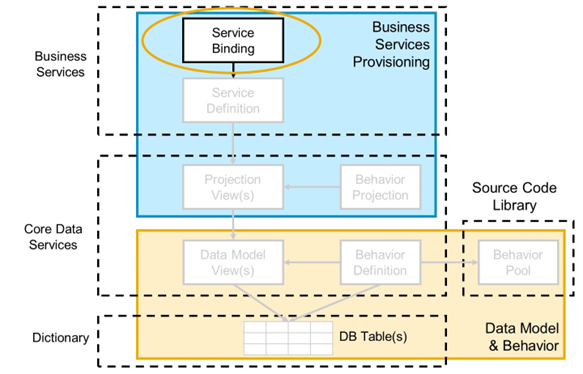
The Service Definition
The business service binding (or service binding) is an ABAP Repository object used to bind a service definition to a client-server communication protocol, such as OData.
A service binding relies directly on a service definition derived from the underlying CDS-based data model. Based on an individual service definition, several service bindings can be created. The separation between the service definition and the service binding enables a service to integrate a variety of service protocols without any kind of re-implementation. The services implemented in this way are based on a separation of the service protocol from the actual business logic.
Creating the Service Binding
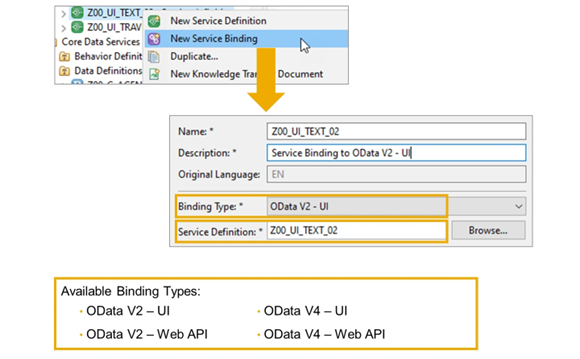
To create a business service binding, we recommend that you use the context menu on the name of the service definition. By doing so, the name of the service definition is automatically set as Service Definition in the Create dialog.
To choose a binding type, both the name of the service binding and a description are required.
There are currently four different values for Binding Type available, with different rules for the service binding name:
- OData V2 - UI
Defines an UI service based on version 2 of the OData Protocol. The naming convention is: Prefix: UI_, Suffix: _02. - OData V2 - Web API
Defines a Web API service based on version 2 of the OData Protocol. The naming convention is: Prefix: API_, Suffix: _02. - OData V4 - UI
Defines an UI service based on version 4 of the OData Protocol. The naming convention is: Prefix: UI_, Suffix: _04. - OData V4 - Web API
Defines a Web API service based on version 4 of the OData Protocol. The naming convention is: Prefix: API_, Suffix: _04.
We will start with an OData V2 UI service, because SAP Fiori element UIs only fully support V4 in draft scenarios, which we will cover later.
Publishing and Testing a Business Service
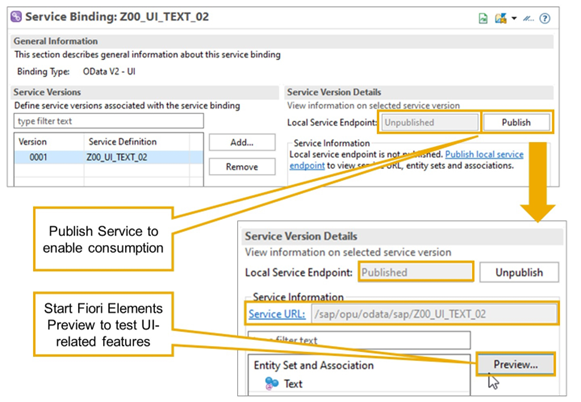
After creating the Service Binding, the local service endpoint of an OData service must be published using the Publish button in the service binding editor. This triggers several task lists to enable the service for consumption. By publishing the service binding, the service is only enabled for the current system. It is not consumable from other systems.
After publishing, the derived URL (as a part of the service URL) is used to access the OData service starting from the current ABAP system. It specifies the virtual directory of the service by following the syntax:
/sap/opu/odata/<service_binding_name>
You can start a Fiori Elements Preview directly from the service binding. With this, you can test UI-related features directly from your ABAP system.