ABAP List Viewer with Integrated Database Access (ALV IDA)
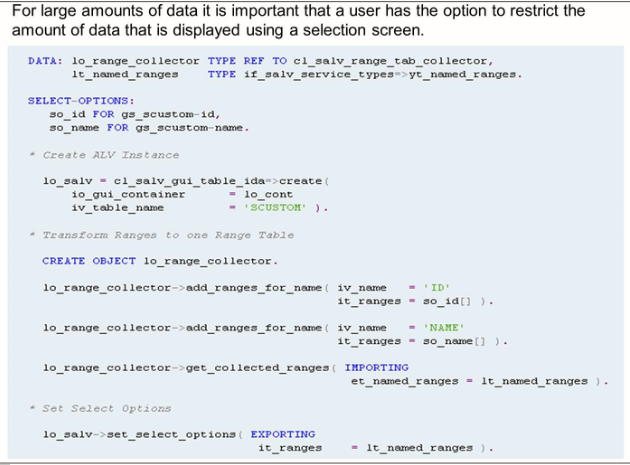
The data retrieval and display are copied from the ALV with IDA. The selection made by the user is transferred to the list using method set_select_options. Use method add_ranges_for_name of class cl_salv_range_tab_collector to convert the selection of the user to the format that is needed for the method set_select_options.
Referencing of Data Elements
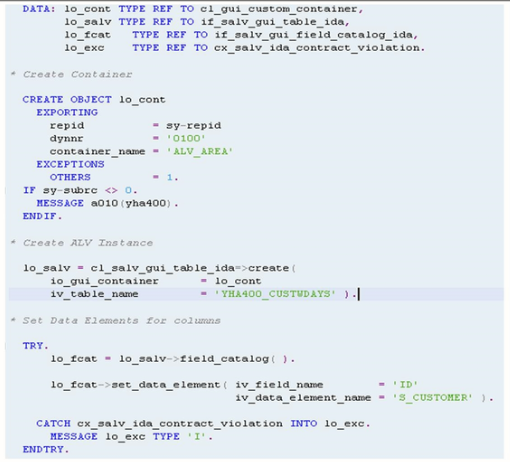
When an external view is derived from an SAP HANA view, the columns in the Dictionary view are not described using data elements, instead, they are directly typed.
Method SET_DATA_ELEMENT of CL_SALV_GUI_FIELD_CATALOG_IDA can be called to reference data elements to be used for each column – the data element will be then be used to determine the column headings in the ALV.
External Views with input parameters
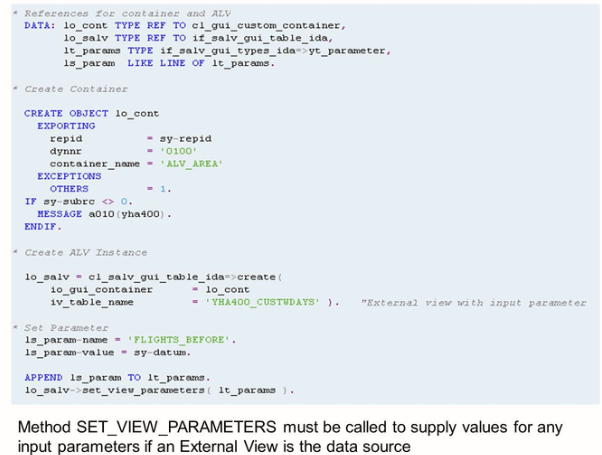
The ALV optimized for SAP HANA can work with external views that have been published to the ABAP Dictionary. The SAP HANA view on which the external view is based on may have input parameters that are used as filters, in calculations, or in scripted logic. For the ABAP application to supply values for these input parameters, they must be passed to the ALV as name-value pairs by calling the method SET_VIEW_PARAMETERS. The query engine transforms these into suitable SAP HANA placeholders and uses them during selection.
Using Fuzzy Search
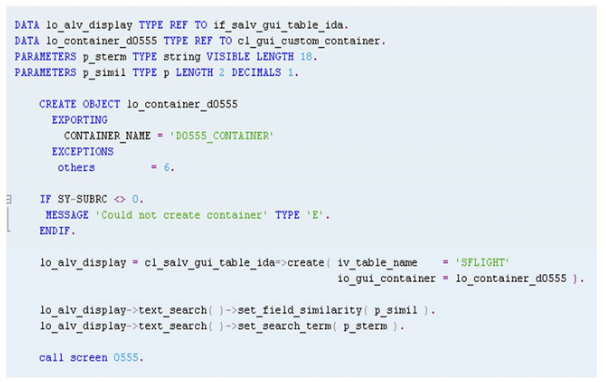
You may want to provide a selection screen in the ABAP application that provides the user with the ability to enter a search term for which they wish to perform a fuzzy search. The ALV API provides methods to do this, as shown in the figure, FUZZY Search Functionality with ALV for SAP HANA.