Creating Domains and Data Elements
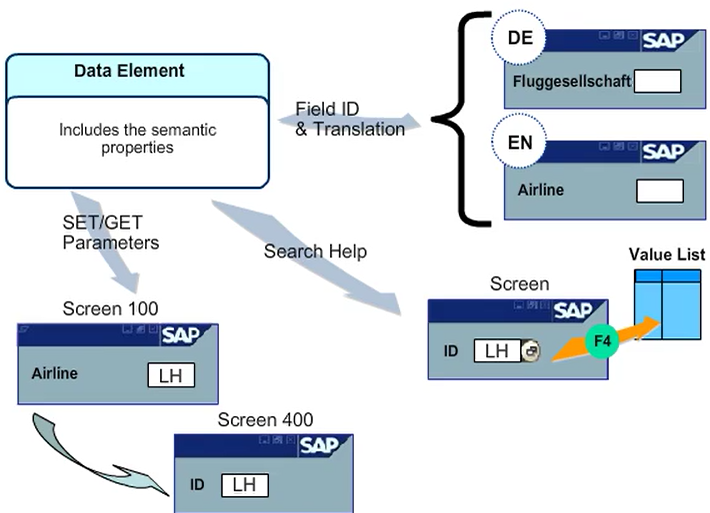
Data elements define data types which can be used on screens, search helps, ABAP programs, and complex data types. Data elements contain both semantic and technical information about the data type.
The technical properties for the data element are maintained on the Data Type tab page. SAP recommends using domains to specify the technical type of a data element. However, you can also define the data element using the same integrated types that are used to define the domains. As a special case, you can also create a data element as a reference type. The referenced type may be any type defined in the dictionary or a generic reference to types ANY, OBJECT, and DATA. A reference of the type ANY can point to both objects and data. The definition as a reference is the same as the type declaration in an ABAP program TYPES tr_dt TYPE REF TO data.
Data Element : Additional Options
- Documentation
You can create a text that describes the contents of the data element. This text is displayed for the F1 help in all screen field that refer to this data element.
- Search Help
A search help( F4 key) can be assigned to a data element.
- Set/Get parameter
Assigning a SET/GET parameter to the data element saves the user from entering the same value several times. A field can be filled with default values from SAP memory. When you exit the screen, the system transfer the value into this parameter. If an input file based on the same data element exists on a subsequent screen, the system reads the value from the parameter and enters it in the screen field. The SET/GET parameters hold the value for each session. These values are not retained after the user has logged off.
- Default Component name
You can assign a default component name to the data element. However, this is effective only if you use the data element as a component in BAPI structure
- Change Document
The system logs changed field contents only if you set the change document indicator for the data element
- Input history
The mechanism that the SAP GUI uses to handle the input history of a screen input field is switched off.
- Bi-directional options