Building CDS Views with Associations
Exposed Associations in Data Preview
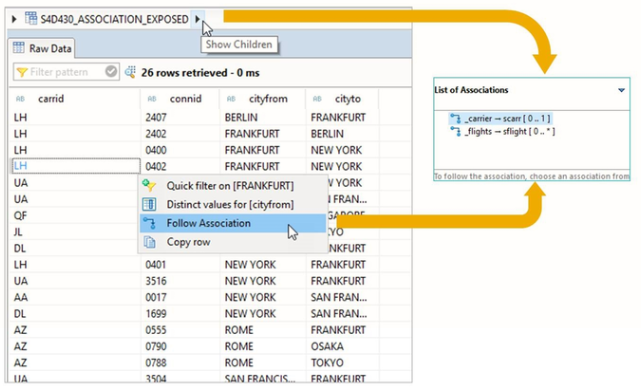
If a CDS view definition contains exposed associations, you can evaluate these associations in Data Preview as follows:
- Open the CDS view in Data Preview
- Choose one of the displayed rows, then click on the arrow next to the view name in the header toolbar.
- Choose an association from the list of available associations.
Path Expressions in CDS DDL
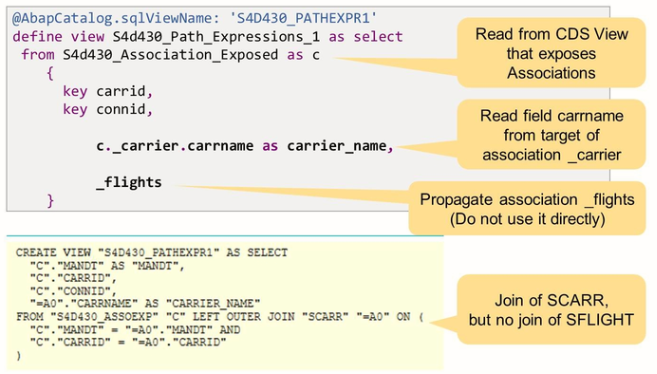
The CDS view in the example above reads data from a CDS view that contains exposed associations. The element list contains a path expression to read field carname from the association target of association _carrier.
Association _flights is not used directly. Instead, it is propagated, which means it is exposed again under the same name.
In the SQL Create Statement for this view, we find a join of the SQL view created for CDS view S4d430_Assocaition_Exposed with database table SCARR. This is because SCARR is the target of association _carrier.
Table SFLIGHT, the target of association _flights, is not joined here. This is because the association is not used but only exposed.
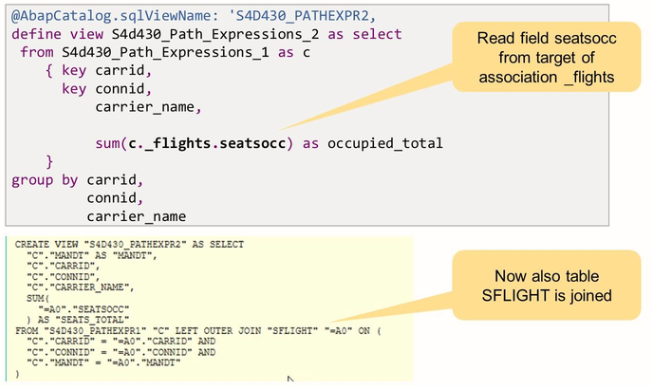
The CDS view in this example reads from the CDS view of the previous example. The element list contains a path expression to read field seatsocc from the association target of association _flights.
In the SQL Create Statement for the view, we find a join of the SQL View created for CDS view S4d430_Path_Expressions_1 with table SFLIGHT, the target of association _flights.
Path Expressions in Open SQL
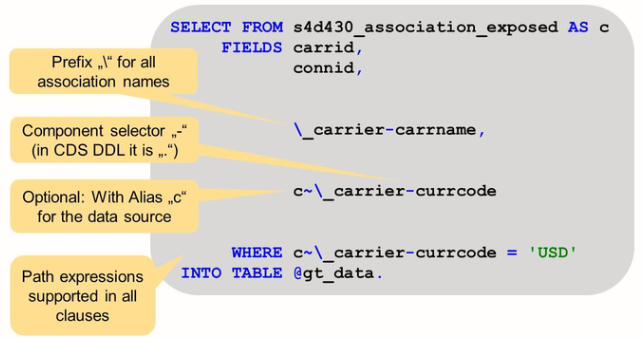
As of release 7.50, path expressions also exist in Open SQL. They are supported in all clauses, e.g. the field list, the WHERE clause, the GROUP BY clause, the HAVING clause.
Compared to path expressions in CDS DDL, the following important differences exist regarding the syntax:
- Prefix “\” is needed for association names
- The component selector is “-“ (in CDS DDL it is “.”).
Syntax of Filtered Associations
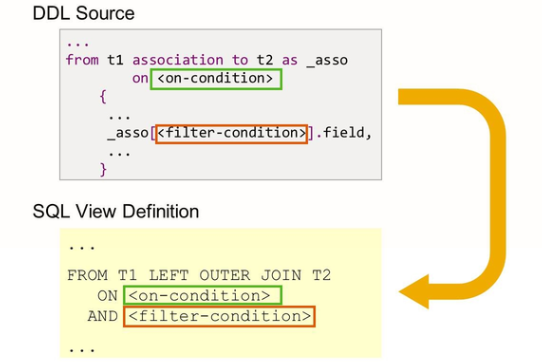
Path expressions in CDS DDL can be extended using a filter condition. The filter condition becomes part of the ON-condition when the system translates the path expression into a join on the database level.
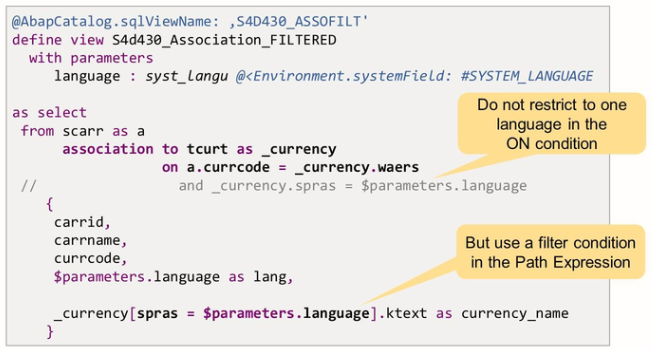
In this example, table tcurt is associated with table scarr. Table tcurt is a so-called text table. It contains names and descriptions for currencies in many different languages. The ON condition of the association defines the basic foreign key relationship between the two tables, i.e., the currency code in table scar is linked to the key field wears in table tcurt.
This association links one carrier with all descriptions of its local currency, independent of the language.
Instead of restricting the selection to one language in the ON condition of the association, the example uses a filter condition in the path expression. Technically, that is on the database, the result is the same. But with the filter condition in the path expression, it becomes clearer which conditions are part of the foreign key relation, and which condition reflects an additional selection.
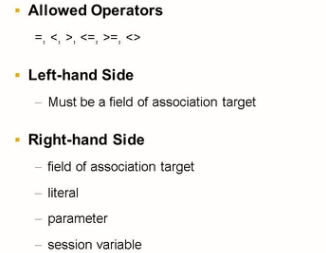
Cardinality in Filtered Associations
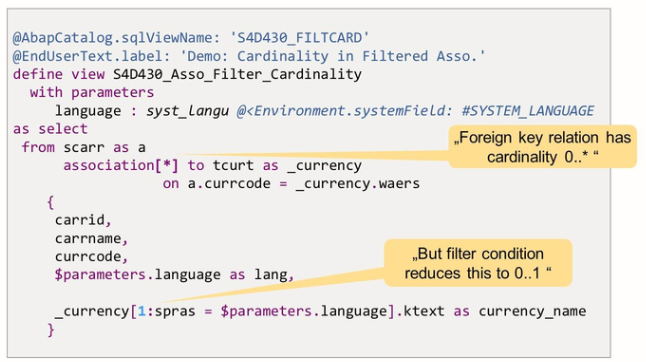
The example above contains an association of table TCURT to table SCARR. The correct cardinality for this association is 0..*: the local currency code of one carrier can have an arbitrary number of texts in table tcurt – one for each language that is maintained.
We already learned that, normally, cardinality * leads to syntax warnings and even errors once the association is used in path expressions.