Defining a Data model
Data Dictionary-Based Data Model Definition
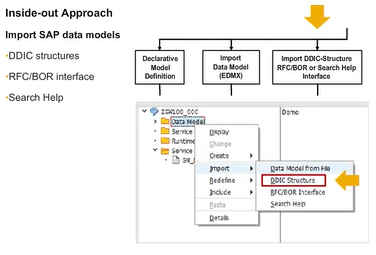
You can import the following Dictionary structures into the Service Builder:
- Structures
- Database tables
- Views
The Service Builder also enables you to create the following entity types from a data source:
- Function module parameters and BAPI parameters
- Search help topics
- CDS views (which are also imported as DDIC structures)
A wizard is provided to guide you through the process.
Entity Type Creation with Wizard
You can use a wizard to create entity types based on existing ABAP structures in an inside-out approach as follows:
- In the first step, the wizard lets you choose a name for the entity type. You can also choose if an entity type or a complex type is to be created.
- Using F4 Help, you select the ABAP structure to be imported.
- When the option create default entity set is selected, the Service Builder creates an entity set called <Name of entity Type>Set, for example, BusinessPartnerSet.
- In the next screen, you select the fields of the data source structure that will be part of the entity type.
- Finally you chose the key field or key fields, since every entity type in OData must have at least one key field. Here, it is also possible to rename the properties of the OData service since the proposed values are generated based on the ABAP field names. Here also, the underscores in the field names are removed and the name segments are merged in a Camel Case notation.
Data Model Import
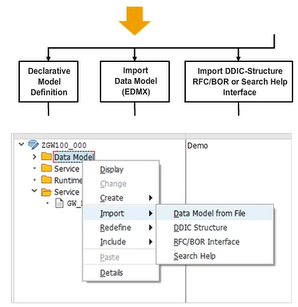
Instead of using data structures that exist in the SAP Business Suite system, it is also possible to import complete OData models that have been designed by OData modeling tools, such as Eclipse or SAP Web IDE, or that have been designed in Microsoft Visual Studio. You can also import complete OData models by importing the $metadata file of an existing OData service.
When performing changes to such a model after it has been imported you can perform a re-import. A wizard will support you when adding and removing elements that have changed in the model.
Runtime Artifacts
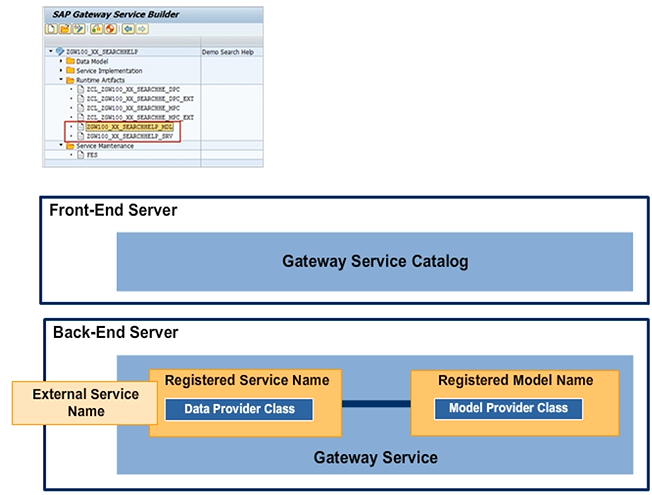
To define the Gateway Service, a configuration wrapper is needed around each ABAP class.
A model is a configuration wrapper for the Model Provider Class. A service is a configuration wrapper for the Data Provider Class. The registered service contains the definition for the external name of the Gateway Service. The external name is the name that is seen by the end user, so it should be meaningful.
The Service Builder performs all of these configuration steps for you.
Generating Runtime Artifacts of an OData Service
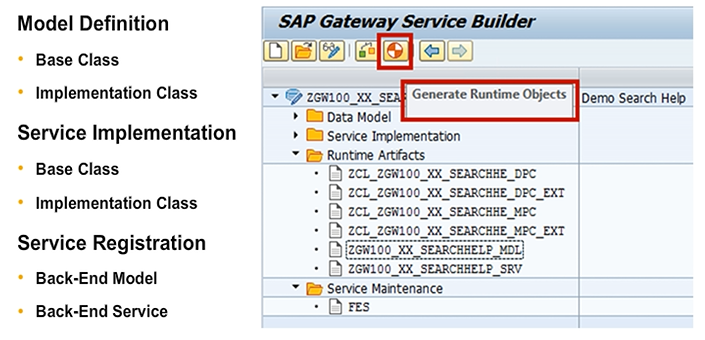
As discussed in the previous lesson, when generating the runtime artifacts of an OData service, the Service Builder generates the Model Provider classes and Data Provider classes for your service. Furthermore, the Service Builder registers both the model and the service in the SAP backend system.
The Service Builder registers the model under the entered technical model name, whereas the service is registered under the entered technical service Name. The technical service name that you specify here determines the name of the service that is exposed by SAP Gateway.
Generated Model Provider Base Class